Showing posts with label iphone. Show all posts

7 Ways to Charge Your iPhone Faster

Wednesday, June 29, 2016

The part that I love most about having an iPhone is that it will stay charged all week, and it doesn't end up dying on long road trips, so I usually don't end up carrying my charger with me everywhere (which is super convenient). But sometimes, you just really need it to charge a bit faster for something- maybe you have a day of travel ahead and would like to have it fully charged, but it's only at 50%! Luckily, you have an hour to get ready- how can you make it charge faster?

1. First, turn on airplane mode. It's gonna save battery because you won't get any notifications or text messages or anything that would use up any of your precious battery life.

2. Now, do the most obvious thing that not everyone knows about; turn on low power mode. This is super easy to do: just go into Settings > Battery > Low Power Mode ON. Battery is in the third little section, in between Touch ID & Passcode and Privacy. Turning on Low Power Mode temporarily reduces the amount of power that is used, which turns off mail fetch, background app refresh, automatic downloads, etc. It also turns your little battery in the corner from green to light orange.

3. Close all of your apps for pete's sake! What do you even think is using all of the battery life?! In case you didn't know this, the most obvious feature on the iPhone, close all of your apps completely by double clicking the Home button, which will show everything that is currently open.

4. Now turn on night shift, a really cool feature that can temporarily disable the blue light your phone is emitting. It gives your screen a bit of a yellowy tint, which is normal. Fun fact: it's been proven that most cases of insomnia are caused by the blue light your device is emitting, because your body thinks it resembles a blue sky, which means daytime, which means don't go to sleep. Turning this off will help your battery life significantly, because ever since I started turning it on when I go to bed, my phone stays charged way longer! You can turn on night shift by pulling up the tool bar on the bottom of your screen and tapping the little icon at the very bottom center that has a moon on it.

5. Turn your brightness all the way down. It doesn't use a whole lot of power, but enough that your iPhone will charge faster if you turn it down. This can be done either in the Settings or in the bottom toolbar.

6. Now plug your phone into a different charger, like one you would use for your iPad. If you don't have one, then this step is optional, but it will guarantee to charge your phone 30% faster than a regular iPhone charger, so I always do this when I want my phone to charge as fast as possible.

7. Finally, turn your phone over. This prevents the screen from lighting up because the it senses that the phone is turned over and face-down (screen down haha), so your screen won't light up every time you get a pesky notification.

I hope this helped you out, and that now your phone can be at 100% as you please! I hate it when my phone gets below 60%, it just bugs the heck out of me and I have to plug it in :(

xo Savannah

8 Inspirational iPhone Wallapapers

Tuesday, May 17, 2016

Your Only Limit Is You:

A wallpaper can mean everything on a phone (or computer, if you're talking about a desktop wallpaper) because it's the first thing you see when you wake up (sometimes). The average person unlocks their phone about 110 times per day, according to Apple- which is A LOT, when you think about it, so you'd better make it count and have a cute, inspirational wallpaper waiting for you. 


Free "You Got This" background for your phone, tablet or desktop! | ineverything.ca:
Inspirational iPhone wallpaper created with the VRSLY app!:


Inspirational iPhone wallpaper created with the VRSLY app!: I AM STRONG | Free download for your phone, desktop or tablet! | ineverything.ca:


kate spade logo gold - Google 搜尋: Keep moving forward | iPhone wallpaper:


iPhone wallpaper : You Are Better Than Unicorns and Sparkles Combined | iPhone 6 wallpaper:

Inspired yet? 

8 DIY iPhone Cases

Tuesday, March 15, 2016

Everyone loves a good phone case. If you're like me and you use your phone nearly all day long, then a pretty case can make all the difference. In my case, I have a turquoise Otter Box, which is very protective so far considering I drop my phone once in a while and keep it in my backpack, pocket, binder, purse, etc. and it's still not broken or cracked. These cases aren't as protective, but they're really cute, and hopefully you're more careful with your phone than I am!

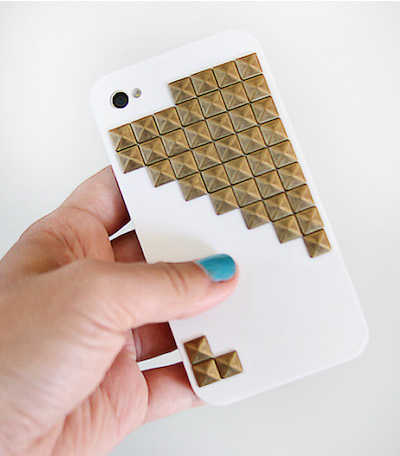
If you're on a quest for the perfect iPhone case or just feeling crafty, make one! From washi tape to chalkboard paint, we've rounded up the best ideas.1. Herringbone Design with Washi Tape by Chronicle Books Blog

2. Studded iPhone Case (as shown in photo) by Julie Ann Art

3. Rainbow Dots Phone Case by Beauty and the Beard

4. Pastel Colorblocked Case with Acrylic Paint by Brit + Co

5. DIY Map iPhone Cases by Maps

6. Pressed Flowers Phone Case by The Etsy Blog

7. Tribal Printed Case with Sharpies by Denise Heredia

8. Polka Dot Case with Nail Polish by Brit + Co

I love these, and especially the tribal print one- it would be really fun to curl up with a tub of Sharpies, a phone case and some Netflix. It looks like it would be really soothing. 

xo Savannah

Declutter Your Life Part 1: Phone & Email

Monday, January 25, 2016

Even if you're the cleanest, most organized person, your phone and email can be the most cluttered things in your whole life. Inboxes get unorganized so easily, because every day you have new emails coming in at you without even giving you a chance to stop them. And your phone (especially if you have kids) can get cluttered quickly because there are so many apps and music and videos it can all form a big ball and run down your memory, just like in Raiders of the Lost Ark with that big boulder chasing Indiana Jones. 

EMAIL

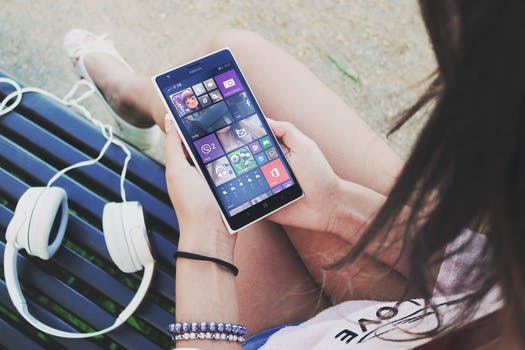
Free stock photo of woman, girl, ipad, tablet-First, you're gonna want to unsubscribe from as much as you can- that's where Unroll.Me comes in handy. Unroll.Me is the most helpful app ever, because it helps you unsubscribe, roll up, and keep all of the emails you've been meaning to tackle for months. Here's how it works- you just sign into your email, and then swipe away all of the emails you want to unsubscribe from, and roll up the ones you want to read, and keep the ones you want to stay subscribed to. You need to be ruthless- remember, if you miss it, you can always subscribe again. 

Free stock photo of beans, coffee, brown-Try to reply to emails ASAP. If not, then the sender will become frustrated/impatient and maybe even forget all about it if you leave it in your inbox for a week. As soon as you see an email for work/etc. then reply to it, if you can't, then leave yourself an important note on your phone/stick a sticky note to your computer or something. Leaving it there will cause it to become buried and you'll forget about it. 

Free stock photo of sea, person, rock-Finally, go in once a week and delete as much as you can. Whether you have 5 minutes or 25 minutes, delete everything that isn't important from all of your folders. My social one is just all YouTube, telling me every single day when a YouTuber uploads something. But try to build a routines of this, going in and cleaning things out and making sure it's organized. 

*Just one little tip that will make checking your email sooooo much better- if you use Gmail, then click on the little settings drop bar in the top right corner, and select "Themes". There are so many beautiful photos to put behind your inbox- personally, I chose Lake Tahoe, because nature can be really soothing when you're overflowing with emails. 
Free stock photo of sky, night, space, tree

PHONE


Free stock photo of road, landscape, rocks, forest-First things first, delete all of those apps you used like crazy for the first hour and haven't touched since you downloaded them. I had quite a few- and most I wasn't worried about, because I could save my progress and if I missed it I could get it again. No, apps don't take up a terrible amount of space at all, but clearing out a few will get you some memory back and plus you'll have room for more. 

Free stock photo of landscape, mountains, clouds, forest-Now you're gonna tackle those photos. No, I don't really think you need six pictures of a hamburger, you can't taste something through a photo- and twenty five selfies that mostly look the same? Keep the good ones, delete the bad. What you should really be worried about it your videos- the can take up over 70 MB of space, AKA a lot. Either upload them to your computer or delete them, because honestly I don't think you need them. Finally, upload most of them to your computer, except for the ones you want to keep on your phone for whatever reason. 

Free stock photo of boat, river, waterfall, Niagara Falls-You know what also takes up a lot of space besides videos? Music. I only have 7 songs on my phone (the rest is on the cloud, I can download them any time) so I don't have to worry about this as much, I'm talking about you over there who has 8,000 songs- do you listen to them all? Just take off a few every day, and if you really love music, then either buy an iPod just for music or download Spotify, which takes up so much less space and it's cheaper to pay for Premium than it is for 8,000 songs on iTunes. 

*Plus, get a wallpaper & lock screen that you actually like- it will make going on your phone so much better, and plus you'll smile every time you look at it. 

I really hope these helped you today, and I can't wait to do more of these in the future- it's kind of fun to help people declutter. And if you liked this, then you will LOVE Marie Kondo's book, The Life Changing Magic of Tidying Up. It's available on Amazon for about $7.00, and I can't wait to check it out.... as soon as I order it which I haven't done yet. 

xo Savannah


My 10 Favorite iPhone Apps Right Now

Thursday, January 14, 2016

In July, I wrote a post about my ten favorite apps right after I got my new phone- but, much like my YouTube Favorites, it's a lot different now than it was then. I SO wish I could do more than ten but I want to mimic my last post, which you can read here. So I guess you could say this is kind of a Throwback Thursday post, which I should totally do more often because I love these. All of these are free on the appstore, except for maybe Colorburn because I got that one when it was Free App of the Week. 

1. Village Life


Free stock photo of smartphone, technology, mockup, apps
Yeah, it's one of those.... I don't usually download these (I'm totally lying I always do) but I saw a friend playing this one and I thought it looked super fun, and I fell in love with this game. It's a lot of fun to give the villagers what they want and gain their happiness, and then having your villagers have babies, and simply just watching them age day by day. 

2. King of Thieves

Yes, I know, thieves are extremely frowned upon- especially where I live. But this game is so addicting, and I'd highly recommend it to everyone, mostly kids 10-11+ because it can be complicated and stuff and it's not great for kids of younger ages who can't understand it. Basically, you have to be the best thief in the world by stealing from other players and basically collecting the most gems. I'm literally playing this right now...

3. Neko Atsume 
Free stock photo of hand, apple, iphone, smartphone

If you speak Japanese, then you know what this game might be about. If not, then I don't expect you to, because I didn't either at first- except for the cat part which I already knew. It's pretty much a game where you have to collect all of the cats by setting out food and toys for them to play with, and then they come and you add them to your cat book. 

4. Word Bubbles

Okay, yes, I only just got this yesterday... But I'm playing it as I type and it's more addicting than chocolate covered Twinkies. It's a word puzzle, so it definitely works your brain, but it feels like just a little game it has a super pretty design that I like, because there are some knockoffs that aren't as good looking. 

5. Goat, Giraffe, Platypus, Zebra & Octopus Evolution

Free stock photo of camera, iphone, smartphone, taking photoI have nearly all of the evolution games, and Zebra & Octopus are my latest ones. Even though these are meant for younger ages (I'm a 3 year old at heart) I love these and they can get quite addicting, not to mention it's constantly changing- once you get past earth, you get to go to Mars and evolve your creatures there. 10/10, would highly recommend. 

6. Colorburn

So I got this one when it was free app of the week, and so far I love it and use it pretty often. It's a photo app with over 1000 filters, and all you have to do is swipe your screen to mix and match in seconds (oops I sound like an infomercial sorry). I've used it a lot, and it's definitely worth it if you're gonna pay money for it, even though I didn't pay for it. 

7. Shooty Skies

Free stock photo of iphone, smartphone, taking photo, photography
This one is way more fun than Crossy Road, and is made by the same exact people. You know how on Crossy Road you just tap the screen, occasionally swipe, and nothing else so it's super boring? Well in Shooty Skies you're flying around, and not tapping, but shooting bad guys and collecting power ups. Much more fun...

8. Candy Crush Jelly Saga

Almost the same as the first two, Candy Crush Jelly Saga is the latest candy saga out there and also probably the best. You get to play against a computer in some levels, battling to win, and in others you have to find a marshmallow that moves to a different spot with every move you make. It can get pretty addicting, which is why I'm sad when I run out of lives...

9. Paper 53

Apple iPhone 6 Plus on a white deskThis is my favorite drawing app of all time, the minimalism design is amazing, but also offers a wide variety of features, including sharing your drawing with other friends with the same app, drawing on other friends pictures and saving them as your own, and using lots of tools to create whatever you please. These are the same people that made the 53 Pencil- yes, the $99 stylus. 

10. Buzzfeed

Finally, last but not least, Buzzfeed. Buzzfeed is really nice to use whenever I'm just bored and need a good laugh, or perhaps just need to catch up on the news- I read it online and on mobile, constantly binge reading one post after the other. Thanks for being there when Netflix wasn't, Buzzfeed. 

Those are all of my favorite mobile apps on 2016, and I'm not sure if all of these are available on Android except for Paper 53; that one is definitely not available, which is disappointing because I was looking forward to using it on my Samsung tablet- but oh well. 

xo Savannah


Theme by: Pish and Posh Designs